关于
FoloToy EVA Music Player
简体中文 | English
Current firmware version: 1.1.0.
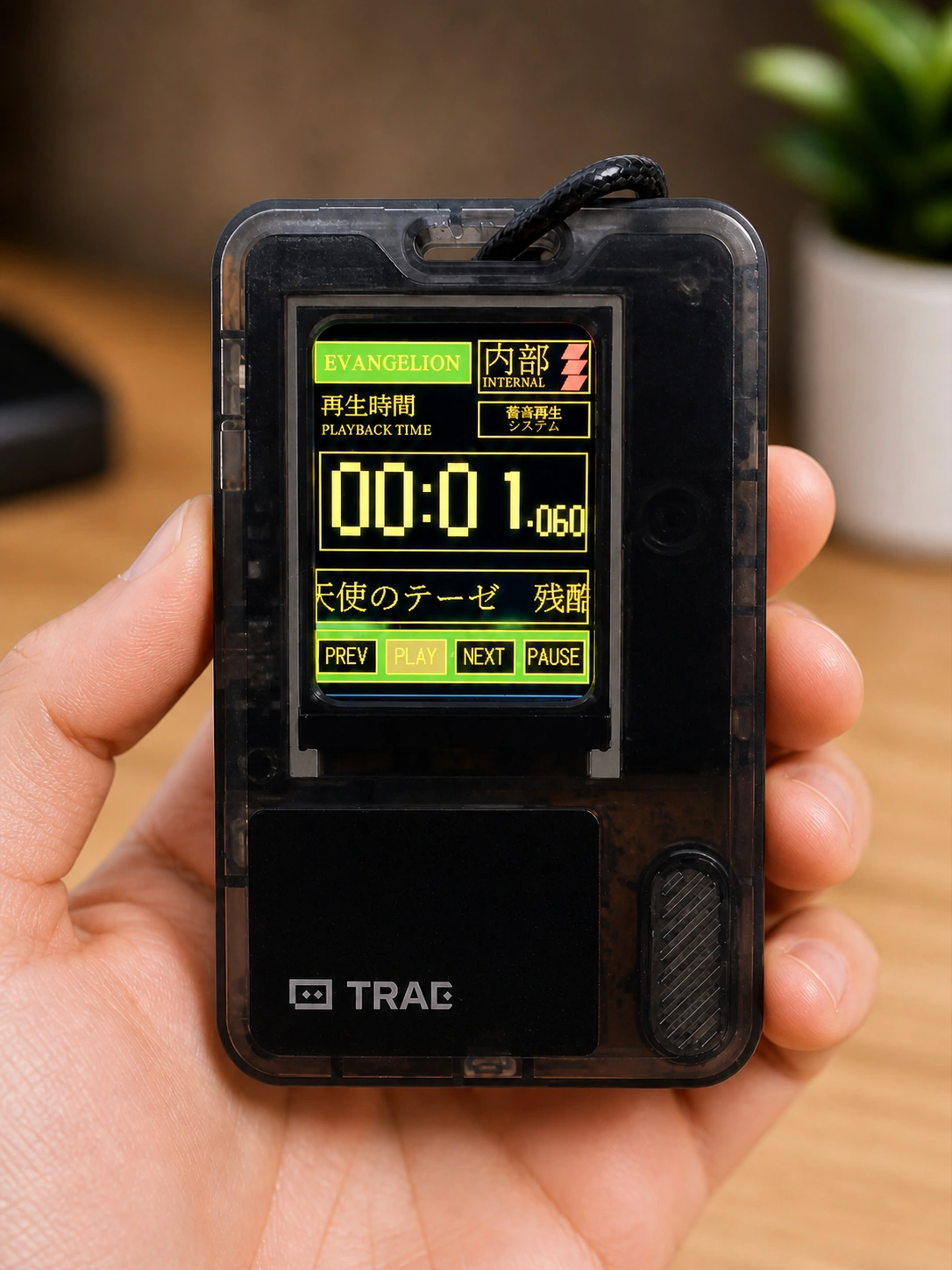
This repository contains an ESP-IDF firmware project for the FoloToy AI Passport. The current application boots directly into a fixed, offline EVA-style music player for the 240 x 320 display and the three physical buttons.
It started from the FoloToy AI Passport hardware baseline, but this checkout is now an application project, not only a hardware demo.
What It Does
- Shows a black startup screen with a centered red NERV-style logo for 3 seconds.
- Opens a front-facing EVA-inspired player UI.
- Starts in the stopped state. It does not play music automatically after boot.
- Plays a fixed local playlist from embedded compressed audio.
- Uses
OKto play and pause. - Uses long-press
OKwhile paused to enter a NERV-logo standby screen;OKclick wakes back to the paused player at the same position. - Uses
UPto highlightPREV, then switches to the previous track on release. - Uses
DOWNto highlightNEXT, then switches to the next track on release. - Freezes at the end of a track for 2 seconds, then automatically plays the next track.
- Scrolls long track titles from right to left like a marquee.
Current display titles:
残酷な天使のテーゼOne Last KissBeautiful World
The original fourth candidate track was removed to keep the firmware within the 8 MB Flash budget.
Important Asset Notice
This repository is intended for source-code sharing. Do not publish copyrighted songs, extracted music, or generated firmware images that contain protected assets unless you have the required rights.
The source code is MIT licensed. Music, trademarks, character names, fonts, logos, and other third-party assets are not included in that license. See NOTICE.md.
For an open-source release, keep these files local unless you can legally redistribute them:
- source music files such as
.mp3,.wav,.flac, or.m4a - generated compressed audio under
assets/audio/*.adpcm - merged firmware images under
release/*.bin
Generated image assets used by the UI are part of the source release for this project. See docs/ASSET_PREPARATION.md and docs/GIT_RULES.md.
Hardware Target
| Item | Current value |
|---|---|
| Board | FoloToy AI Passport |
| MCU | ESP32-C3 |
| Flash | 8 MB |
| PSRAM | None |
| Display | ST7789P3, 240 x 320, RGB565, portrait |
| Buttons | UP, DOWN, OK on one ADC resistor ladder |
| Audio | ES8311 over I2S0 |
| Battery gauge | CW2017 on shared I2C0, optional at runtime |
| Console | Native USB Serial/JTAG |
Detailed pin, display, audio, button, battery, and memory notes are in docs/AI_HARDWARE_DEVELOPMENT_GUIDE.md.
Project Layout
components/bsp/       Board support package: display, buttons, audio, battery, I2C
main/                 EVA player application, generated UI assets, playback model
assets/audio/         Local generated ADPCM audio files, not for public release
tools/                Asset conversion and inspection scripts
tests/                Host-side logic and asset validation tests
docs/                 Hardware, architecture, asset, and release documentation
partitions.csv        8 MB Flash partition layout with a 4 MB factory app slot
sdkconfig.defaults    ESP32-C3, USB console, LVGL, Flash, and partition defaults
The main architecture is documented in ARCHITECTURE.md.
Build
Use ESP-IDF 5.5.x. The firmware has been developed with ESP-IDF 5.5.3.
idf.py set-target esp32c3
idf.py build
On a fresh public checkout, the build requires locally generated audio and logo assets first. The expected generated audio files are:
assets/audio/track0.adpcm
assets/audio/track1.adpcm
assets/audio/track2.adpcm
If these files are missing, prepare your own legally usable tracks and follow docs/ASSET_PREPARATION.md.
Flash
Flash the connected board with ESP-IDF:
idf.py -p COM13 flash monitor
Use the actual port shown on your computer. COM13 is only the last verified local device port.
Full Firmware Image
A merged full image can be created after a successful build by combining:
| Offset | File |
|---|---|
0x0 | build/bootloader/bootloader.bin |
0x8000 | build/partition_table/partition-table.bin |
0x10000 | build/Folotoy_EVA_player.bin |
The previously verified local image was named:
release/FoloToy-EVA-music-player-full.bin
The 1.1.0 full image is named:
release/FoloToy-EVA-music-player-full-v1.1.0.bin
Do not publish a merged image if it embeds copyrighted audio or an official logo image.
Tests
The project has host-side tests for the pure player model, ADPCM decoding, clock formatting, title layout, generated text assets, logo conversion, and RGB565 color output.
Recommended checks before release:
$env:PYTHONPATH = "tools"
py -m pytest tests
The C host tests are plain C programs. Build them with a local C compiler and run the produced executables:
cc -std=c11 -Wall -Wextra -Werror -Imain tests/test_eva_player_model.c main/eva_player_model.c -o build_test_eva_player_model.exe
cc -std=c11 -Wall -Wextra -Werror -Imain tests/test_eva_adpcm.c main/eva_adpcm.c -o build_test_eva_adpcm.exe
cc -std=c11 -Wall -Wextra -Werror -Imain tests/test_eva_clock.c main/eva_clock.c -o build_test_eva_clock.exe
cc -std=c11 -Wall -Wextra -Werror -Imain tests/test_eva_track_layout.c main/eva_track_layout.c -o build_test_eva_track_layout.exe
cc -std=c11 -Wall -Wextra -Werror -Imain tests/test_ui_pixel_math.c main/ui_pixel_math.c -o build_test_ui_pixel_math.exe
An ESP-IDF build proves the firmware compiles. It does not replace hardware testing on the actual device.
Current Verified Behavior
The last verified local firmware did the following on a FoloToy AI Passport:
- booted without a reboot loop
- showed a red NERV-style logo on a black background
- entered the player without autoplay
- played the three embedded tracks
- kept button highlight states in sync with play, pause, previous, and next actions
- entered and exited the NERV-logo standby screen from paused playback
- reduced output volume to avoid obvious small-speaker distortion
- held the exact end timestamp for about 2 seconds, then advanced to the next track
The app image was close to the 4 MB application partition limit, so new assets should be reviewed carefully.
Contributing
See CONTRIBUTING.md and docs/GIT_RULES.md. Keep hardware facts in components/bsp, keep application state testable, and keep redistributable source separate from local media assets.
特性
一键安装
通过 Web Serial API 在浏览器内直接刷写固件到你的 AI Passport
播放中先短按 OK 暂停,再长按 OK 进 NERV,待机页短按 OK 回播放器
需要 Chrome/Edge 89+ · 不支持时可查看手动教程
手动安装教程 ↗