关于
简体中文 · English
FoloToy Shuangseqiu Firmware
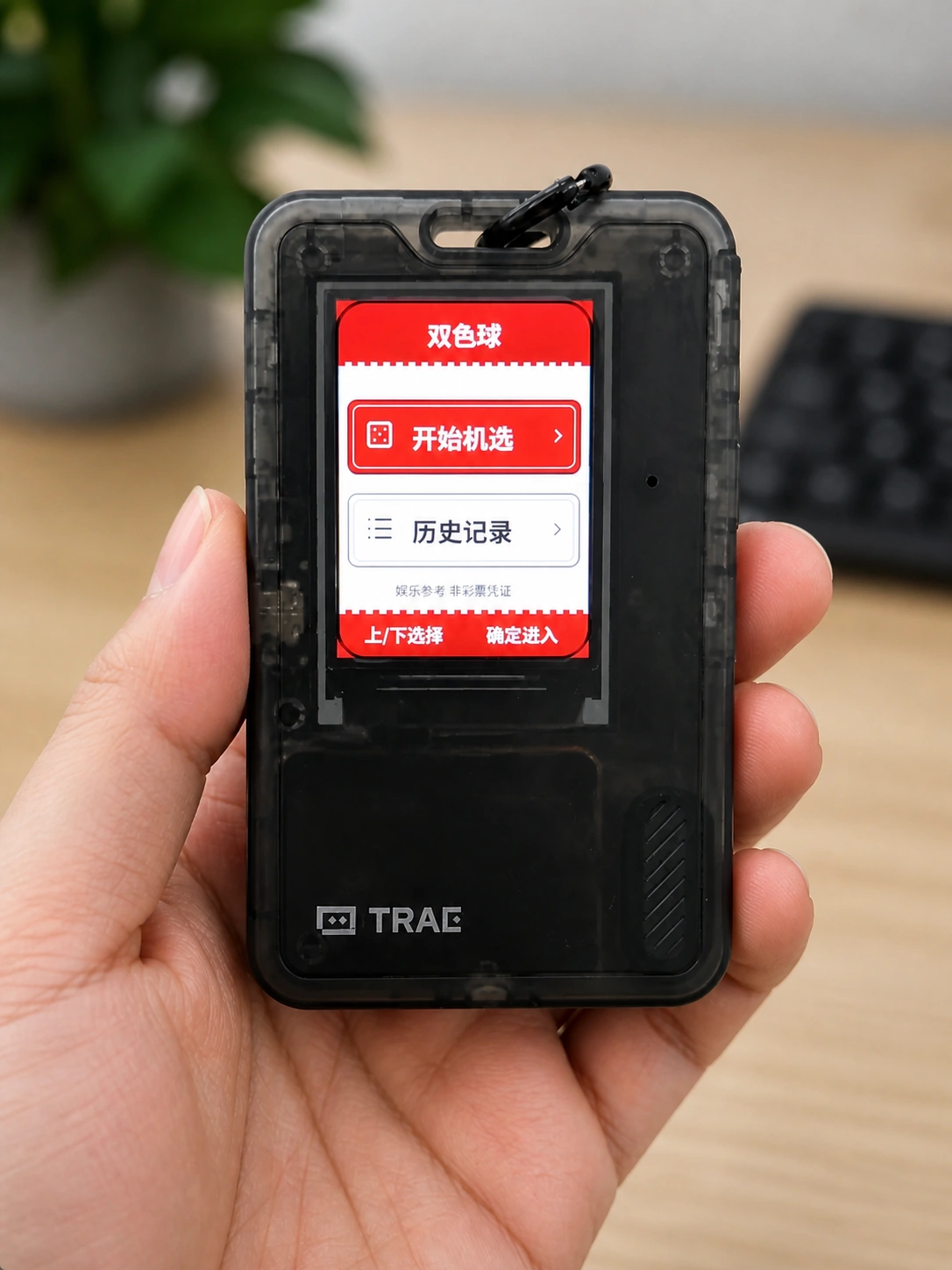
This fork turns FoloToy AI Passport into a standalone offline Shuangseqiu quick-pick device.
It boots directly into a Chinese lottery-style app UI instead of the upstream demo menu. The app generates one single-entry Shuangseqiu number set locally, shows the latest records from the current boot session, and uses a fixed 240 x 320 image-based LVGL interface for stable rendering on ESP32-C3 without PSRAM.
This firmware is for entertainment reference only. It does not sell tickets, predict draw results, check prizes, connect to any lottery service, or create a redemption credential.
Current app behavior
- Home screen: choose
Quick PickorHistory. - Quick-pick screen: short OK generates one entry; long OK returns home.
- History screen: shows the latest 10 entries generated during the current boot session.
- History detail screen: short OK returns to the list; long OK returns home.
- Every boot clears saved Shuangseqiu history and starts with empty history.
- Red numbers are six unique values from 1 to 33, displayed in ascending order.
- The blue number is one value from 1 to 16.
Hardware target
- Board: FoloToy AI Passport
- Chip: ESP32-C3
- Flash: 8 MB
- Display: 240 x 320 portrait RGB565
- Input: UP, DOWN, OK physical buttons
- Constraint: no PSRAM
Build
The repository baseline recommends ESP-IDF 5.5.3. The current local package was built with ESP-IDF 5.5.4 because that is the available local environment.
From an activated ESP-IDF PowerShell:
idf.py -B build-idf554-pencilexport build
Generate the merged firmware image:
idf.py -B build-idf554-pencilexport merge-bin -o FoloToy-AI-Passport-full.bin
Generate an 8 MB full-flash image by padding the merged image with 0xFF to exactly 8,388,608 bytes. The current release artifact name is:
folotoy_shuangseqiu_V1.0.0.bin
Flash
Flash the normal ESP-IDF segmented build:
idf.py -B build-idf554-pencilexport -p COM14 flash
Flash the 8 MB full image from offset 0x0:
python -m esptool --chip esp32c3 -p COM14 -b 460800 --before default_reset --after hard_reset write_flash --flash_mode dio --flash_size 8MB --flash_freq 80m 0x0 .\folotoy_shuangseqiu_V1.0.0.bin
Replace COM14 with the actual serial port if needed.
Validate
Run the repository checks and host tests:
$env:PYTHONUTF8 = '1'
& 'C:\Users\User\AppData\Local\Programs\Python\Python313\python.exe' 'tools\check_repo.py'
The host-side Shuangseqiu logic test is in tests/test_shuangseqiu_model.c.
Firmware image verification checks that:
- bootloader is at
0x0; - partition table is at
0x8000; - app is at
0x10000; - the full-flash image is exactly 8 MB.
Important files
main/demo_shuangseqiu.c— LVGL screens and dynamic overlay.main/shuangseqiu_model.c— Shuangseqiu rules, generation, and history model.main/shuangseqiu_store.c— NVS history handling; clears history on every boot.main/shuangseqiu_rng.c— secure random source.assets/images/shuangseqiu/backgrounds/— 240 x 320 Pencil-exported background PNGs.tools/gen_shuangseqiu_backgrounds.py— converts background PNGs to RGB565 C resources.tools/verify_firmware.py— verifies firmware layout and merged image offsets.docs/software-design/shuangseqiu-app-design.md— detailed product and software design.
Generated build directories, release artifacts, and caches are intentionally ignored by Git.
特性
一键安装
通过 Web Serial API 在浏览器内直接刷写固件到你的 AI Passport
查看 GitHub 仓库 ↗需要 Chrome/Edge 89+ · 不支持时可查看手动教程
手动安装教程 ↗